
Document Flow Automation in 2026: The Definitive Guide for Modern Businesses
Introduction: Why Document Flow Automation Matters in 2026
Modern businesses generate and process an enormous volume of documents—from contracts and invoices to HR requests and internal reports. Manual handling of these documents not only consumes valuable time and resources but also introduces errors, compliance risks, and bottlenecks.
In 2026, document flow automation has become a critical lever for organizations to reduce costs, accelerate workflows, and ensure data security. This comprehensive guide explores the practicalities, benefits, and best practices for automating document management in today’s enterprise environment.
---
What is Document Flow Automation?
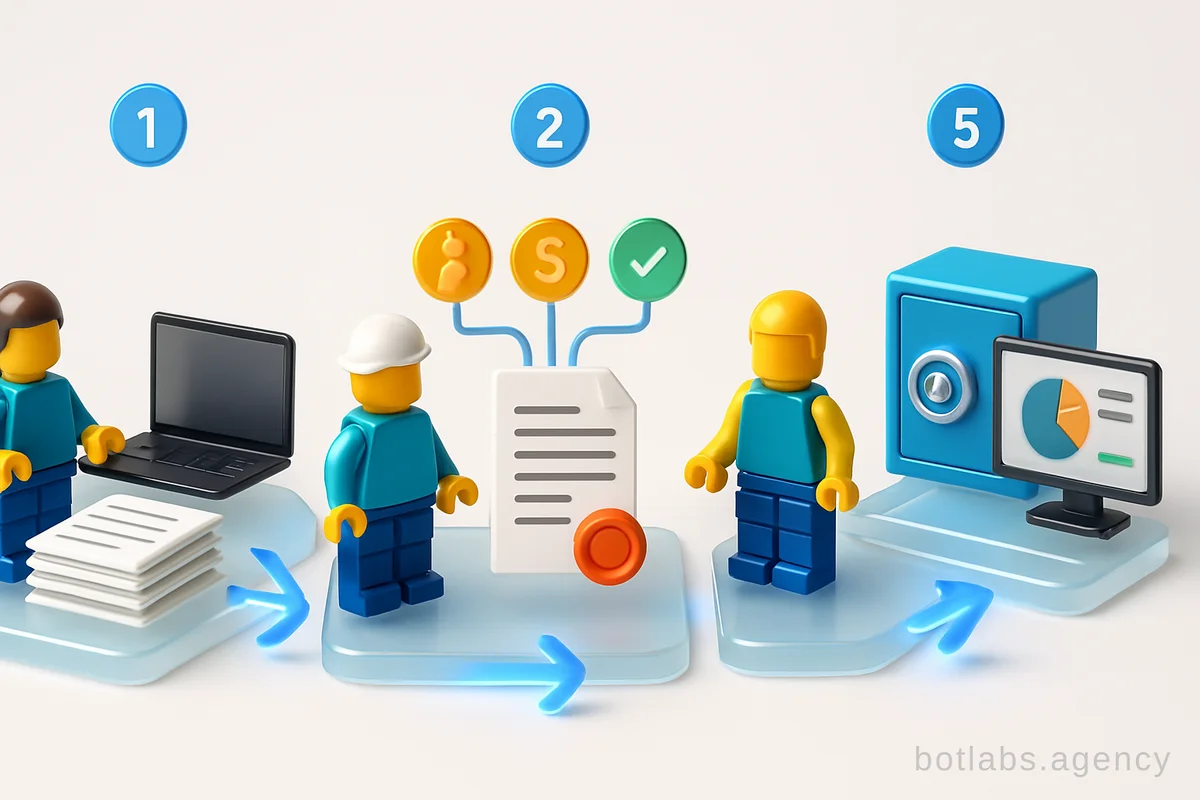
Document flow automation refers to the implementation of digital tools and processes that replace manual document handling with automated workflows. Unlike mere digitization (scanning and storing documents), true automation involves:
- Automatic document generation
- Routing documents for approval and signature
- Data extraction and validation
- Integration with CRM, ERP, and accounting systems
- Secure archiving and retrieval
Key Benefits
| Benefit | Impact |
|---|---|
| Speed | Faster document processing and approvals |
| Cost Savings | Reduced paper, printing, and admin costs |
| Error Reduction | Automated checks minimize human mistakes |
| Transparency | Real-time tracking and audit trails |
| Compliance | Meets regulatory standards (GDPR, ISO 27001, etc.) |
Tip: Automation is not just about going paperless; it’s about streamlining end-to-end business processes for measurable ROI.
---
How Document Automation Works in Practice
Imagine an employee submits a purchase request. With automation:
- The request is assigned a unique ID and routed to the responsible manager.
- The manager reviews and forwards it for approval via a few clicks.
- Executives receive instant notifications and can approve or sign from any device, even a smartphone.
- Once approved, the document is automatically archived in a secure repository.
Should any step be delayed, the system sends reminders or escalates to ensure progress. Integration with other business systems means, for example, an invoice can flow directly from email into the finance module, reducing manual data entry and errors.
Automation isn’t about pressing a magic button; it’s about building a robust, interconnected workflow that eliminates routine tasks and empowers teams to focus on value-added activities.
---
Real-World Examples: Automation in Action
1. Automated Contract Management
- System generates contract templates based on business type (supply, services, leasing, etc.).
- Counterparty data is pulled directly from the CRM.
- The contract is routed for digital approval and signed electronically.
- Archive and retrieval happen automatically.
- Result: What once took days is now completed in hours.
2. Invoice Processing with OCR
- Supplier invoices are received via email or portal.
- OCR (Optical Character Recognition) extracts relevant data.
- The system checks invoice details (number, amount, items) against purchase orders.
- Approved invoices are posted directly into accounting software.
- Result: Error rates plummet; financial transparency increases.
3. Internal HR Requests (e.g., Leave Approvals)
- Employees submit requests through a digital form.
- Automated routing sends the request to managers for approval.
- Upon approval, HR is notified and records are updated.
- Result: No more paper forms or lost requests; decisions happen swiftly.
---
Step-by-Step: Implementing Document Flow Automation
- Audit Existing Processes:
- Map out current document workflows. Identify bottlenecks, redundancies, and pain points.
- Set Priorities:
- Decide which document types/processes offer the greatest ROI if automated (e.g., contracts, invoices, HR).
- Choose the Right Platform:
- Ensure the solution covers your functional needs, supports integrations, and is scalable.
- Configure & Integrate:
- Set up templates, approval routes, and connect with your CRM/ERP.
- Train Staff:
- Provide training and clear instructions to ensure smooth adoption.
- Monitor & Optimize:
- Collect feedback, measure KPIs, and refine workflows as needed.
Tip: Start with one or two high-impact document flows before scaling automation across your organization.
---
Key Criteria for Choosing a Document Automation System
| Criteria | What to Look For |
|---|---|
| Functionality | Support for all required document types and processes |
| Usability | Intuitive interface, mobile compatibility |
| Integration | APIs for CRM, ERP, email, e-signature, etc. |
| Scalability | Modular expansion, support for growing document volumes |
| Security | Data encryption, 2FA, compliance with global standards |
| Cost | Transparent pricing, demo/trial availability |
Practical Considerations:
- Can non-technical staff configure workflows (low-code/no-code)?
- Does the system offer automated notifications and reminders?
- Is there robust backup and disaster recovery?
Tip: Prioritize systems that can be easily adapted as your business evolves.
---
Overcoming Challenges in Document Flow Automation
While the case for automation is compelling, successful implementation requires addressing both technical and human factors:
- Change Management: Employees may resist new systems due to fear of job loss or complexity. Robust training and clear communication of automation’s benefits are key.
- Hybrid Workflows: Some processes may need to remain partially paper-based due to external requirements. Plan for a transition period.
- Data Migration: Migrating archives and legacy documents requires careful planning and validation.
Example Callout:
A leading Ukrainian retail chain migrated 70% of documentation to digital archives, resulting in over 100,000 documents securely stored and accessible for audits—proving compliance and efficiency gains.
---
Security and Compliance: Protecting Your Digital Documents
Security is paramount when automating document workflows. Look for solutions that offer:
- End-to-end encryption
- Role-based access control
- Comprehensive audit logs
- Cloud backups with data residency in compliant jurisdictions (e.g., EU for GDPR)
- Support for digital/electronic signatures
Table: Security Features Checklist
| Feature | Importance | Meets Standard? |
|---|---|---|
| Data Encryption | High | Yes/No |
| Two-Factor Authentication | High | Yes/No |
| GDPR/ISO Compliance | Mandatory (EU/Global) | Yes/No |
| Backup & Recovery | Critical for continuity | Yes/No |
---
Measuring ROI: Automation in Numbers
A well-implemented automation system delivers measurable business results. Typical gains include:
- Time Savings: Companies report 30–50% reduction in document processing times.
- Cost Reductions: Less spending on paper, printing, and administrative labor.
- Productivity: Staff freed from routine paperwork can focus on higher-value tasks.
- Error Minimization: Automated validation reduces costly mistakes.
Example from Ukrainian Market
A major agribusiness automated document routines and achieved:
- 50% less time on signatures
- 80% staff adoption within a year
- 50% of counterparties onboarded to e-documents
---
Practical Tips for Smooth Transition
- Engage Stakeholders Early: Secure buy-in from leadership and key users.
- Pilot First: Run a controlled pilot to refine processes and train staff.
- Continuous Improvement: Use analytics and feedback to optimize over time.
Tip: Use an ROI calculator to estimate real savings from reduced printing and labor costs before full deployment.
---
Table: Comparison of Manual vs. Automated Document Workflows
| Aspect | Manual Workflow | Automated Workflow |
|---|---|---|
| Processing Time | Days | Hours/Minutes |
| Error Rate | High (manual input) | Low (automated checks) |
| Cost per Document | High (paper, labor) | Low (digital process) |
| Audit Trail | Poor | Full, transparent |
| Scalability | Limited | High |
---
Q1: Is document flow automation only for large enterprises?
No. Modern solutions are scalable and suitable for SMEs, startups, and large organizations alike. Cloud-based platforms make it affordable and accessible for any size business.
Q2: How does automation affect compliance?
Automated systems help enforce compliance by maintaining detailed audit trails, supporting secure digital signatures, and ensuring documents are stored in accordance with regulations.
Q3: What if my business needs to retain some paper documents?
Hybrid approaches are common. Start by automating high-volume or high-impact processes, and gradually digitize remaining workflows.
---
For more insights on business automation and digital transformation, visit our blog or explore our guide on chatbots for business in 2026.

Need a chatbot for your business?
We automate your processes and boost sales.