A chatbot for B2B dealers: catalogues, documents, and requests
- How a B2B dealer bot differs from a retail bot
- Workflows a dealer chatbot can handle
- KLEIBERIT case: a multilingual bot for multiple markets
- REHAU case: a team-managed Viber FAQ
- MedHouse Club case: distributor sales in messaging apps
- Architecture: one admin panel, several channels and countries
- How to measure a dealer bot’s value
- Conclusion
- Frequently asked questions
- Sources
A dealer chatbot gives partners quick access to accurate product details, certificates, instructions, and specialists. It also gives manufacturers one place to manage information and route requests across messaging channels. Accuracy matters in B2B: an incorrect specification can delay a partner’s work.
How a B2B dealer bot differs from a retail bot
A retail bot usually helps someone choose and buy. A B2B bot must provide verified information and route technical questions to the right person.
| Area | Retail bot | Dealer bot |
|---|---|---|
| User | Shopper | Dealer manager, engineer, or installer |
| Main task | Choose and buy | Find precise information or get advice |
| Content | Catalogue and offers | Specifications, certificates, manuals, price lists |
| Access | Usually open | May require partner verification |
| Requests | Orders and status | Technical question or quote request |
| Segmentation | Shopper interests | Country, region, and partner type |
Workflows a dealer chatbot can handle
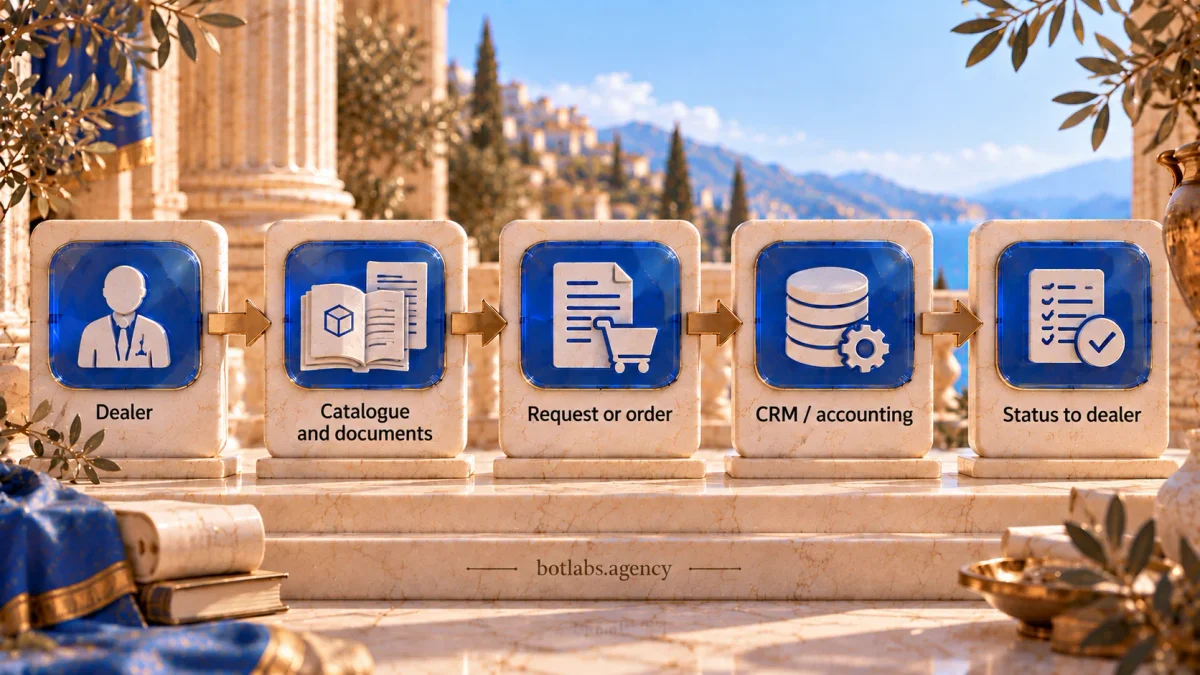
A useful starting set includes a catalogue and documents, SKU search, product selection by application, specialist requests, nearby-dealer search, and segmented updates. A distributor that takes orders may also need a cart, payment, and delivery statuses.
For the bot to help, product information must stay current, and requests must reach the right person with contact details and context. Segment updates by country, product range, or partner type.
KLEIBERIT case: a multilingual bot for multiple markets
BotLabs built Telegram and Viber services for industrial adhesives manufacturer KLEIBERIT. The project includes a catalogue with specifications, certificates, and documents; SKU search; selection by application; technical requests routed as tickets; dealer search; an FAQ; and updates segmented by country and tags. One restricted panel manages countries, translations, and content for both channels. Read the KLEIBERIT case study.
REHAU case: a team-managed Viber FAQ
In the REHAU project, an open Viber bot presents a structured FAQ. Authorized staff can edit questions and answers in a restricted web panel without releasing a new bot version. The panel also lists users of the service. This helps when product information needs regular updates. See the REHAU case study.
MedHouse Club case: distributor sales in messaging apps
BotLabs built a Telegram and Viber store for MedHouse Club, connected to its accounting system. Catalogue data and stock are synchronized, and customers can follow order information. The MedHouse Club case study describes the implementation. The published case confirms LiqPay payments, Nova Poshta delivery statuses, and referral bonuses that become available after a 14-day return period. It shows how a service can extend from information to order placement.
Architecture: one admin panel, several channels and countries
For multiple markets, centralize shared logic while preserving local differences. Plan a shared catalogue, country-specific text and dealer contacts, administrator roles, product availability, and partner verification for restricted areas. For Telegram and Viber, plan one backend and panel, a category tree with the option to hide a product, local contacts, and administrator rights by country. Phone-number identification can gate restricted sections and tickets. Keep core logic and data on the backend so the process does not depend on one channel.
How to measure a dealer bot’s value
Start with a goal, such as reducing the steps to find a document or speeding up technical replies. Then track successful searches, document views, request volume, response time, partner activity, and campaign engagement. Compare with a baseline and check data quality: activity alone does not prove the task was solved.
Conclusion
A dealer bot should deliver accurate information and route complex questions to specialists. Start with a current catalogue, documents, search, and requests. For multiple countries, plan local data with centralized management; for sales, synchronize catalogue, prices, and stock with the accounting system and add payment and delivery-status updates.
Frequently asked questions
Show catalogues and documents, find products by SKU, route specialist requests, locate dealers, and send targeted updates.
Often yes for partner price lists and materials. General information can remain open, while sensitive sections require verification.
Use shared tooling and logic, while managing translations, contacts, product ranges, and availability by country.
With an admin panel, the manufacturer’s team can manage catalogues, FAQ, and campaigns. Technical changes remain separate work.
Yes, when catalogue, prices, and stock sync with the accounting system and order updates flow back to the bot.
Track successful searches, document views, requests and response time, dealer activity, and message engagement against a baseline.
Sources
Dealer chatbot implementation consultation
In 15 minutes with a BotLabs implementation specialist, discuss how dealers access your price lists, product documents, and technical support. Choose one workflow for the first stage and identify the data and integrations to prepare.
Documents for dealers.
Requests for specialists.
15 minutes with an implementation specialist: catalog access, documents, and technical request routing.