
Real Estate Agency Automation: From Portal Enquiry to Property Viewing
- Where portal enquiries get lost
- From enquiry to viewing: which steps to automate
- Qualify buyers without over-questioning
- Match properties and verify availability
- Viewings: available slots and agent handoff
- Lead sources, QR codes, and reporting
- Buyer data, access, and retention
- Roll out automation in stages
- Conclusion
- Frequently asked questions
- Sources
When a buyer submits an enquiry on a property portal, the agency needs to understand what they are looking for and route the request to the right agent. Enquiries also arrive through the agency website, messaging apps, phone calls, and QR codes on listings. If every source feeds a separate inbox or spreadsheet, context gets lost: agents cannot see previous contact, buyers repeat their requirements, and managers cannot tell what should happen next.
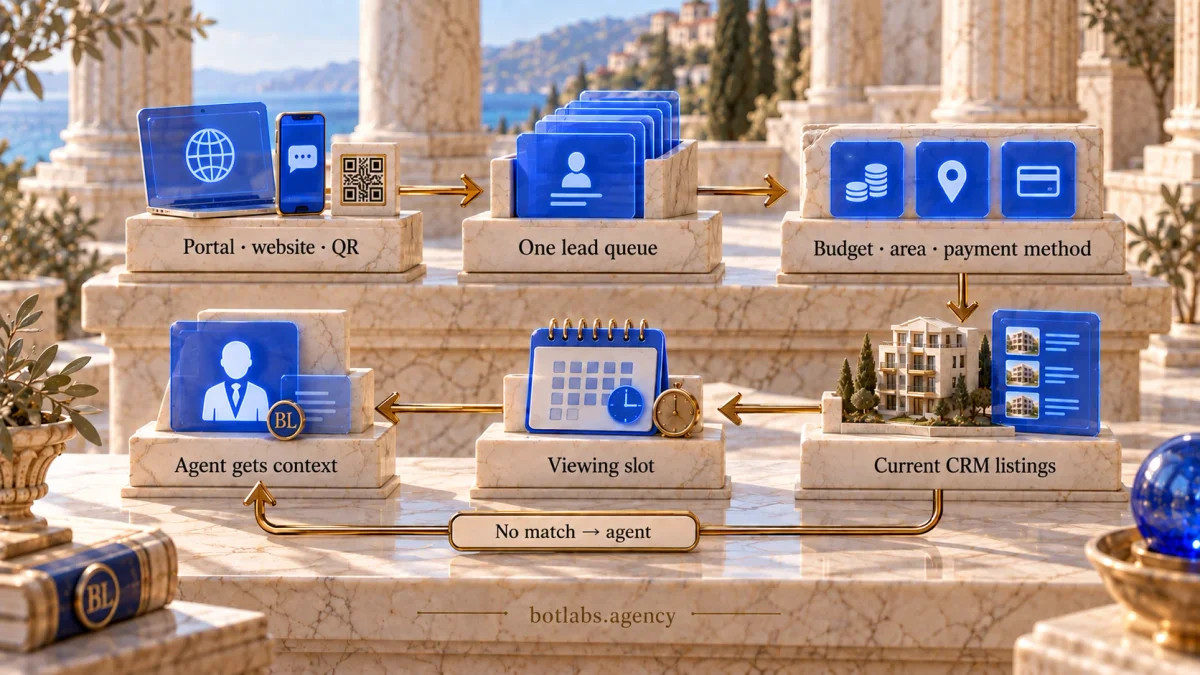
Automation can bring this journey into one workflow: record the lead source, ask a few relevant questions, find suitable properties in a verified catalogue, offer available viewing times, and pass the agent a complete enquiry record in the CRM. A bot can handle routine steps; negotiations, detail checks, and decisions about a transaction remain with people.
Where portal enquiries get lost
The gaps often appear between channels. A portal sends an email, the website creates a CRM message, and a phone call stays on an agent’s device. Without a shared queue, managers see separate conversations instead of a process. One enquiry may create duplicate records or have no owner at all.
To diagnose the issue, trace several recent enquiries from their source to the first meaningful contact. Record when each arrived, its channel, assigned owner, contact attempts, qualification outcome, and next action. This helps show whether the cause is an integration, queue assignment, working hours, or missing reminders. Our guide to automating incoming enquiries covers the same handoff problem.
From enquiry to viewing: which steps to automate
Start with repeatable actions that have clear rules and verifiable outcomes. A bot does not need to own the entire property sales cycle.
| Step | What the system does | What the agent checks |
|---|---|---|
| Intake | Creates or updates a lead and records the channel, listing, or property | Whether details are sufficient and the lead is not a duplicate |
| First response | Confirms receipt and asks approved questions | Whether a call or another channel is needed |
| Qualification | Records property type, area, budget, timing, and financing preference | Whether the request is realistic and what needs clarification |
| Matching | Filters the current catalogue against the stated criteria | Whether the listing cards reflect actual availability |
| Viewing | Shows available slots and records the selection | Confirms details with the seller and checks logistics |
| Handoff | Creates a CRM task with conversation history and a reminder | Continues the consultation and records the outcome |
Assign an owner to each step and define exceptions: there is no suitable property, the buyer asks for a call, a slot is already taken, or a portal integration is temporarily unavailable. Design the data flow between the bot and CRM with the same care as the chatbot-to-CRM integration workflow.
Qualify buyers without over-questioning
At the first step, ask only what is needed to respond and search: buying or renting, property type, preferred area, budget range, timing, and preferred contact method. The system can then ask about bedrooms, floor, condition, or other criteria when they affect the search.
Financing preference can be recorded as a voluntary answer, including interest in Ukraine’s єОселя state mortgage programme. Do not ask a bot to determine eligibility or promise a rate: the bank assesses eligibility, loan amount, and approval under current rules. Programme terms change, so check the official єОселя website before updating a conversation flow.
Keep responses structured without turning the first conversation into a long form. Let buyers skip optional questions and ask for an agent to contact them personally. Managers can later see which details are most often missing from a useful property search.
Match properties and verify availability
AI can turn a free-text message into search criteria, such as “a two-bedroom flat near the metro, not on the ground floor, up to $80,000.” But suggestions must come from the agency’s catalogue, not from model-generated facts. Price, address, floor area, availability, and listing status should each have a defined source and last-updated time.
Start with explainable filters and ranking rules: budget, area, number of rooms, and must-have conditions. If information is missing, the system should ask a question or say that there is no exact match. It must not fill gaps with invented property features. An agent should check availability before sending a shortlist; rejected options can help refine the next search.
Viewings: available slots and agent handoff
Viewing bookings can be automated if the calendar reflects real agent and property availability. Buyers should see only open slots; after a selection, the system should check availability again before confirming and add the meeting to the calendar and CRM. If the property owner must approve, the message should clearly say the request is awaiting approval.
Send an agreed reminder with the address or meeting point and a contact method. Let the buyer cancel or request another time. After the viewing, a bot may ask one short question about the experience and pass the answer to the agent. That step does not replace a conversation about transaction terms.
Lead sources, QR codes, and reporting
To compare channels, each listing link or QR code can carry a source label and property identifier. Save these as separate lead fields instead of leaving them only in a free-text note. Reports can then show which listings bring enquiries that progress to contact or a viewing.
Useful operational measures include new enquiries by channel, duplicate rate, time to first response, leads with an assigned owner, qualified requests, proposed and confirmed viewings, cancellations, and loss reasons. Compare like-for-like periods and define each measure consistently. These numbers alone do not prove that a particular channel or bot caused a sale.
Buyer data, access, and retention
Contact details, enquiry history, and buyer preferences need a clear collection purpose, limited access, and a retention period. Ukraine’s personal data law requires, among other things, that processing match a defined purpose and that the data collected be adequate and not excessive. Do not ask for identity documents, a precise home address, or financial evidence in the first message when they are not needed for that step.
Tell people who processes their data, why it is used, and how to make a request about their rights. Check which CRM roles can see buyer and owner contacts, how agent access is revoked, and how long inactive leads are retained. Have a qualified professional review the legal model for the specific process; this article is not legal advice. See the Law of Ukraine on Personal Data Protection.
Roll out automation in stages
- Map the current journey. List portals, website, phone, messaging apps, QR links, owners, and data stores.
- Choose one workflow. For example, a new enquiry from one portal: create the lead, send a first response, assign an agent, and create a follow-up task.
- Agree on the data model. Define required fields, deduplication rules, status source, access rights, and error handling.
- Test with sample enquiries. Include a duplicate, incomplete request, after-hours enquiry, unavailable property, and unavailable time slot.
- Run a limited workflow and review it. Check CRM records, buyer messages, agent tasks, and reports; add other channels after fixing issues.
The scope of a first release depends on portal APIs, catalogue quality, calendars, and the existing CRM. If the system cannot verify that an action succeeded, it should mark the result as unknown and provide a clear manual review path.
Conclusion
Start with one shared enquiry queue and a clear handoff from portal to assigned agent. Then add qualification, matching against a current catalogue, and booking only genuinely available viewing times. The CRM should preserve the source, conversation history, and next action, while managers should be able to see delays without guessing at performance. Automation helps when it simplifies repeatable work, leaves decisions to specialists, and gives the team a safe way to handle exceptions.
Frequently asked questions
Bring enquiries from one priority channel into the CRM, record the source, assign an owner, and create a tracked response task. Verify this route before adding other portals and channels.
It can turn stated requirements into filters and show options from a current catalogue. An agent should verify availability, details, and fit before advising the buyer.
No. With the buyer’s consent, it can record interest in the programme and pass the question to a specialist. Current requirements and the loan decision must be checked against official rules and with the bank.
Connect a calendar with real availability, check the slot again before confirmation, and record the meeting in the CRM. If the owner must approve it, clearly mark the booking as pending.
Only what is needed to respond and search: contact details, enquiry type, area, approximate budget, and timing. Explain the purpose of processing and avoid collecting documents or unnecessary financial details at this stage.
Compare the share of enquiries with an assigned owner, first-response time, duplicates, completed qualification, and confirmed viewings over equivalent periods. Keep definitions and data sources consistent.
Sources
Real estate agency automation consultation
In 15 minutes with a BotLabs specialist, discuss your lead sources, CRM, and viewing arrangements. Identify the first step to automate: lead intake or viewing coordination.
From inquiry
to viewing.
Discuss how your agency works.
Identify a first implementation step.