
How to Integrate a Chatbot with a CRM: Fields, Synchronization, and Error Handling
A chatbot-to-CRM integration should pass along more than the text of a conversation. It should provide the business with the data it needs: who got in touch, through which channel, what the customer needs, and what the team should do next. To avoid duplicate records and lost leads during outages, define the events and data-exchange rules first, then choose how to connect the systems.
This guide covers four common integration approaches, field mapping, contact identification, two-way status updates, and error handling.
What a CRM integration can do for a chatbot
When a bot and CRM operate separately, a manager often copies data by hand, and the next employee has to establish the context all over again. An integration can create or update a CRM record after a defined bot event, pass along the lead source, and store answers in structured fields.
Depending on the process, the team may receive:
- a CRM contact and lead after someone completes a questionnaire or requests a consultation;
- the source of an inquiry, campaign ID, or deep link for attribution;
- an inquiry history or short summary available to the responsible manager;
- an order, appointment, or lead status update in the bot;
- an error log that shows an administrator which transfers failed.
An integration alone does not guarantee higher sales. Results depend on data quality, how quickly the team responds, and whether the automated scenario reflects the actual business process.
4 ways to connect a chatbot to a CRM
Choose an approach based on the number of systems and events, your data-transformation requirements, and who will maintain the integration.
| Approach | When it fits | What to check |
|---|---|---|
| Native connector | You need to pass a standard lead or contact between supported services | Which fields, events, and directions are supported, and what plan limits apply |
| Automation platform | You have a few clear workflows that can be connected with ready-made steps | Operation limits, run history, retries after errors, and ownership of the workflows |
| Direct API integration | You need custom logic, data validation, or a close connection to the bot’s backend | Authentication, API limits, versions, retries, and maintenance |
| Separate integration service | Several channels and systems share exchange rules, or those rules change often | Added complexity, service ownership, monitoring, and a recovery plan |
There is no universally best option. A ready-made connector may be enough for one simple flow; in a more complex environment, a separate service can keep integration logic distinct from individual channels. Before choosing, check the documentation and limitations of your specific CRM and bot platform.
A 7-step integration plan
1. Define the events and expected outcome
Record what triggers a transfer: a new inquiry, a completed questionnaire, an order, a status change, or a request for a person. For each event, decide which CRM record should be created or updated: a contact, deal, task, note, or another object.
2. Map the fields
Field mapping specifies which bot value goes into which CRM field, in what format, and whether it can be missing.
| Data from the bot | Possible CRM field | What to agree on |
|---|---|---|
| Phone number or email | Contact phone or email | Normalization, validation, and how to find an existing contact |
| Name | Contact name | Whether the field is required and how to handle an empty value |
| Channel user ID | Custom field or linked record | How to reply safely in the same channel |
| Questionnaire answers | Contact, deal, or lead fields | Field type, allowed values, and defaults |
| Channel, campaign, deep link | Source or attribution fields | How to retain the original source and later interactions |
| Communication consent | Consent field and related record | The channel and purpose covered by consent, plus when and how it was obtained |
Do not put every answer into one long comment if the team needs to search, filter, or report on it. At the same time, avoid creating a field for every minor detail: the data model should support the decisions the team actually makes.
3. Set contact-matching and duplicate rules
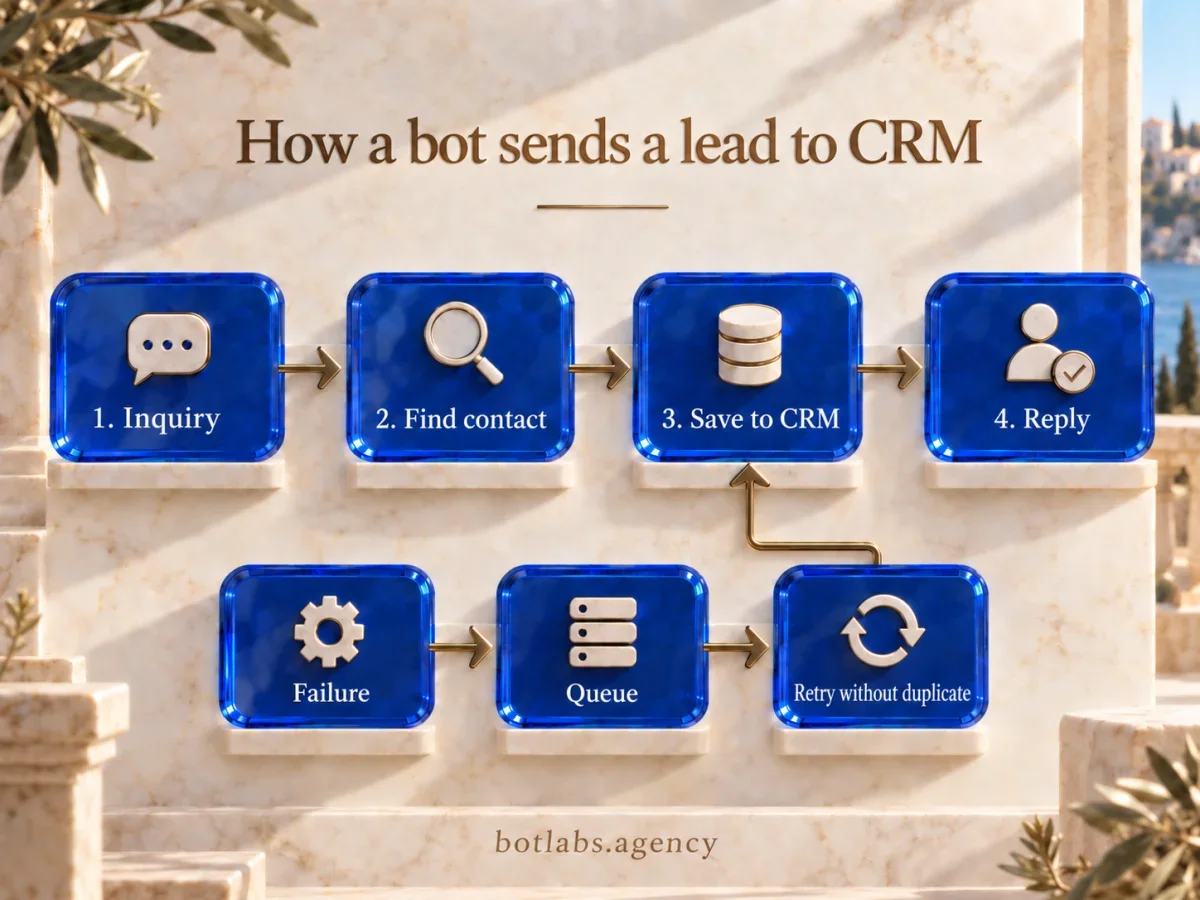
Before creating a new contact, check whether a matching record already exists. A phone number or email can be a matching key if it is available, current, and normalized consistently. In a messenger, a user ID may help send a reply through the same channel, but it does not always identify a person in the CRM by itself.
Also define what happens when someone gets in touch again: update the contact, create a new deal, add an activity to an open deal, or send the record for manual review. In the UA Made project, a phone number is used to look up a profile in the database: the system retrieves data for an existing customer and creates a record for a new one. This illustrates one specific identification rule; it is not a ready-made rule for every CRM.
4. Choose the direction of synchronization
One-way transfer sends data from the bot to the CRM. Two-way synchronization also returns changes from the CRM to the bot, such as an appointment confirmation or order status.
For updates in the other direction, decide which system is the source of truth for each field, which events trigger a message, and how to prevent a loop where a change sent back triggers the same integration again. Webhooks can report an event without constant API polling, but event availability and retry policies depend on the service. Check its documentation before designing the flow.
5. Plan retries and recovery
A temporary network failure, an API rate limit, or an unavailable CRM should not silently turn into a lost lead. Provide a queue or another retry mechanism, a log with timestamps and outcomes, a notification to the owner, and a way to reconcile CRM records with bot events.
HTTP status code 429 means the client sent too many requests within a given period; a specific API may also tell you when to retry. Do not retry immediately or assume every error should be handled the same way. If a response is lost after a record was created, a retry may create a duplicate. Use an idempotency key or check the result of the previous attempt if the API supports it. Queues and retries aid recovery, but failed messages and repeat processing still need oversight.
6. Restrict integration access
Create separate credentials for the integration and grant only the permissions required for its defined events. Keep secrets out of code and logs, and plan for credential rotation and revocation. If the bot transfers personal data, define the minimum data set, retention period, and who may access it.
7. Test scenarios and set up monitoring
Before launch, test more than a successful lead: include a repeat inquiry, a missing field, an invalid format, a duplicate, an unavailable CRM, a rate limit, and a redelivered event. For each test, record the expected CRM record and what the customer should see.
After launch, monitor the error rate, transfer delay, failed retries, and discrepancies found during reconciliation. Decide who receives alerts and what they should do with messages that could not be delivered automatically.
BotLabs project examples
Public case studies illustrate different tasks involving chatbots, CRMs, and other systems. They are not universal blueprints for every business.
- UA Made: the bot checks a phone number against a database, retrieves data for an existing customer, or creates a record for a new one. This shows the role of an identification rule in a loyalty program.
- BUDE GOOD: as part of AI call analysis, BotLabs linked a call record to deal context in KeyCRM; the conversation summary and next step are recorded in the deal comment. This is an example of adding context from another channel to a CRM.
- NFM AGRO: a mobile CRM exchanges data with an ERP, while offline mode lets staff keep working without a network and sync changes after connectivity returns. This is an enterprise CRM/ERP project, not an example of transferring chatbot leads to a CRM. It illustrates why conflict handling and recovery rules need to be designed separately.
Common integration mistakes
- Storing every questionnaire answer in one text field when the team needs separate fields.
- Creating a new contact or deal for every repeat inquiry without checking existing records.
- Leaving the source of truth undefined, so systems overwrite each other’s values.
- Creating a duplicate on retry after a timeout because idempotency was not planned.
- Failing to log errors or assign an owner to the failed-event queue.
- Granting the integration broader permissions than it needs.
- Sending a CRM message back to the bot without checking the channel, consent, or whether the contact details are current.
How long does an integration take?
The timeline depends on API access, documentation quality, the number of events, data quality, and whether two-way exchange is needed. That is why estimating a project only by the number of fields or the name of the CRM is unreliable.
For an initial assessment, prepare a list of scenarios, sample input data, the CRM objects you need, status requirements, and the people responsible for access. This makes it possible to define the first phase, dependencies, and how to verify the result. General timelines from another project are not a guarantee for yours.
Conclusion
A reliable chatbot-to-CRM integration starts with clear events, fields, and data ownership. Next, define how contacts are matched, the direction of synchronization, access rights, and what happens during an outage. Test retries and discrepancies before launch, and give the team a log and a clear recovery path.
If your process requires chatbot inquiries to create or update CRM records, discuss which fields and events to review first. A 15-minute conversation can identify the key questions and next step; a technical project estimate comes after the scenarios and systems have been reviewed. Discuss an integration with BotLabs.
Frequently asked questions
First check whether your bot and CRM support the native connector you need. If its limitations are a problem, use an automation platform or an API integration. Before configuration, define the events, field mapping, and duplicate-handling rules.
Normalize an available identifier, such as a phone number or email, and search for a matching contact before creating one. For a repeat inquiry, decide separately whether to update the contact, create a new deal, or add an activity to an existing one.
Yes, if the CRM provides the required event or API and the bot can message the user in the relevant channel. Agree in advance on the recipient identifier, the source of truth for the status, consent, and safeguards against update loops.
Save the event for retry, log the error, and notify the owner. When service returns, check whether the operation already succeeded so a retry does not create a duplicate. The specific mechanism depends on the API and integration architecture.
Not always. A connector or automation platform may be enough for a few simple flows. Consider a separate service when rules are shared across many channels, are complex, or change frequently; factor in the cost of maintaining it as well.
Sources
- RFC 6585, section 4: HTTP 429 Too Many Requests.
- HubSpot: Configure webhook subscriptions — an example of an event-driven mechanism; capabilities vary by platform.
- HubSpot: Guidance on retries, 429s, and idempotency — a technical example of one platform’s behavior.
- BotLabs: UA Made loyalty program.
- BotLabs: BUDE GOOD AI for sales.
- BotLabs: NFM AGRO mobile CRM.
Chatbot–CRM integration consultation
In 15 minutes with an integration specialist, we’ll discuss how one lead reaches your CRM: the trigger, required fields and how to find an existing contact. You’ll leave knowing what to check before implementation.
Start with one lead
in your CRM.
Discuss the trigger, fields and contact.
Identify the next check.