
AI Bot Security for Business: Access, Data, and Action Controls
An AI bot may do more than answer customers. If it reads internal documents, retrieves CRM records, or calls tools, a bad response can become an access, reputation, cost, or system-change problem. Security starts with boundaries rather than a “perfect prompt”: what data the model can see, what it may do, and who checks the result.
In August 2026, OWASP published a new edition of its Top 10 for large language model applications. It is a useful threat map, not a certification or a ready-made checklist for a particular product. This guide turns that map into practical business controls, from data flows to agent permissions and pre-launch checks.
Where AI bot risk begins
Risk depends on where the technology sits in a process, not what it is called. A bot that follows approved scripts has a different risk profile from an AI assistant that searches documents, while an agent allowed to change CRM records needs tighter controls still. If you are comparing these options, see how chatbots, AI assistants, and agents differ.
Map the path of one request: who sends it, where the system gets context, which components process it, where the answer may go, and which actions it can trigger. Mark external sources—emails, attachments, web pages, and customer messages—separately from internal systems such as CRM, a knowledge base, ERP, and file storage. Non-obvious access often appears at the boundaries between them.
What changed in OWASP 2026
OWASP Top 10 for LLM Applications 2026 was published on August 3, 2026. OWASP describes it as an updated threat map for LLM applications, informed by community threat analysis and practice. Use it to identify classes of issues; set priorities based on your own data flows, permissions, and the impact of failure.
There is another relevant update for agents: on September 1, OWASP introduced the Agent Control Standard (ACS), focused on being able to see, constrain, and verify an agent’s access and actions while it runs. The practical implication is straightforward: an agent should be observable and controllable at runtime, rather than relying only on instructions in its prompt.
Five control areas for businesses
1. Input and prompt injection
Prompt injection is an attempt to change a model’s behavior through text in a request or in a source it reads. The instruction may be direct (“ignore your previous rules”) or hidden in an email, document, or web page. Trust boundaries need technical enforcement: treat source content as data, do not let it rewrite system rules, and never execute its commands automatically.
Separate untrusted text, constrain retrieval sources, check responses before acting, and test realistic attack scenarios. A protective sentence in a prompt is not a sufficient barrier by itself. OWASP recommends combining safeguards such as constrained behavior, output validation, least privilege, human approval, and testing.
2. Access to sensitive data
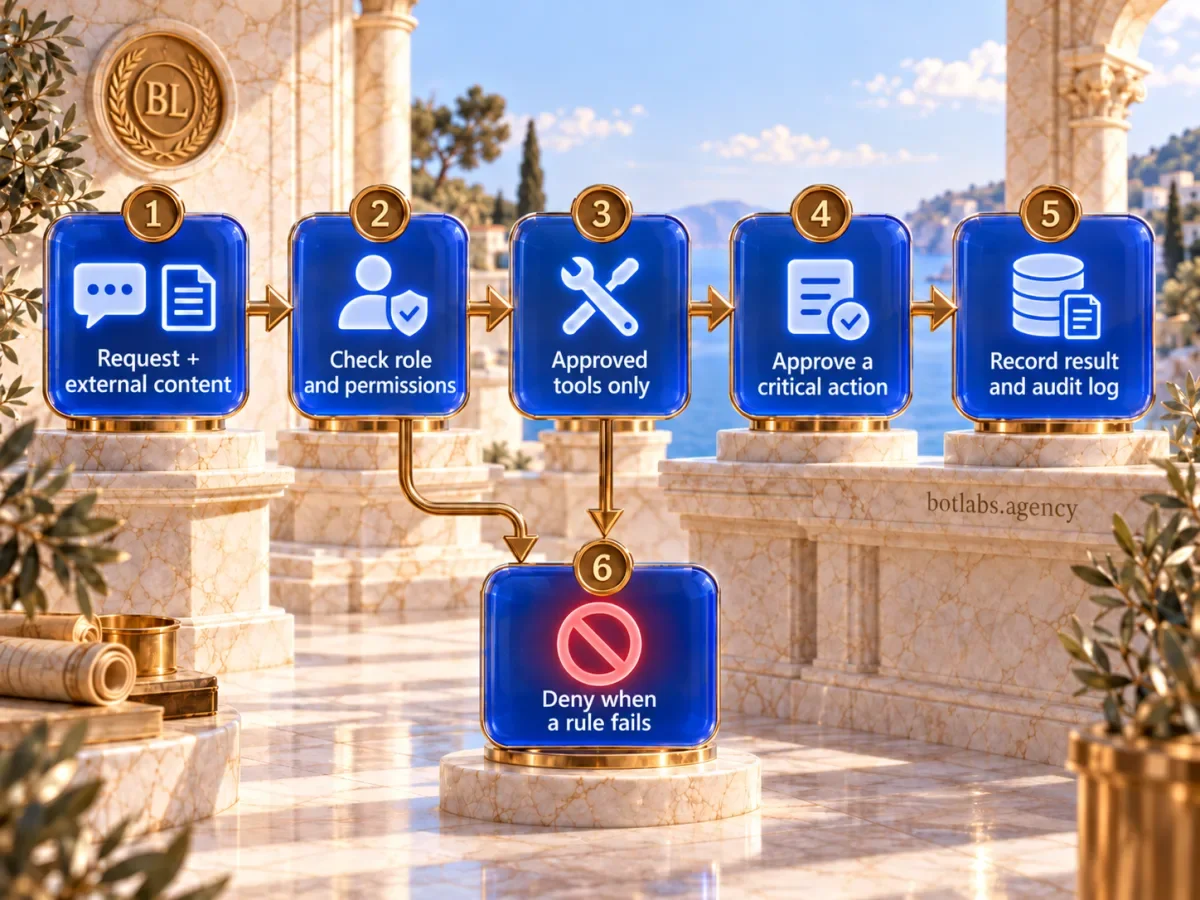
A model can answer only from information available through its context, retrieval, or tools. Enforce “show only what is needed” before generation: check the user’s role and permissions at the data source, and restrict fields and documents. Do not ask the model to decide on its own who may see a record.
Review logs, analytics, transfers to third-party providers, and retention periods as well. For a sensitive workflow, document which data is actually needed, what is masked, who can access logs, and how data is removed under the approved process. Legal grounds and privacy obligations are a separate topic; this article focuses on the system’s technical boundaries.
3. Agent permissions and tools
If an agent can create a deal, change a status, send an email, or delete a record, every tool becomes part of the attack surface. Give it a narrow set of operations and the minimum required permissions. Permission to search for a contact, for example, should not imply permission to export the entire database.
Separate preparing an action from executing it. Before an irreversible or financially significant change, show a person the exact parameters for approval. Enforce authorization on the server at every call, not just in the interface or prompt. For CRM, define which fields an agent can read and change and how to recover from a mistaken operation. Our guide to connecting a chatbot to a CRM covers integration rules and failure handling.
4. Outputs, actions, and human review
Do not assume model output is safe just because your system generated it. Validate formats and allowed values before displaying it, writing to CRM, or sending it to another service. Escape output for its context and use parameterized database queries. Avoid letting a model compose arbitrary SQL or tool URLs when a controlled parameter schema will do.
Decide in advance when the bot answers with a source, declines, or hands the conversation to a person. For important workflows, keep an audit trail of the user, context source, tool called, parameters, result, and approval. Avoid putting unnecessary secrets or complete personal records in logs.
5. Dependencies, abuse, and cost
Models, libraries, retrieval indexes, connectors, and external APIs each bring availability and version-change risks. Keep an inventory of dependencies and owners, update components, and limit request rates and budgets. Set timeouts, maximum context length, and agent step limits. These controls reduce the chance of runaway loops and help contain failures.
For the knowledge base, control who can add or change documents, how they are indexed, and when old copies are removed. Changes should be traceable and recovery should be possible. Measure more than the cost of one model call: include retries, retrieval, external tools, monitoring, and human handling of exceptions.
Restricting an agent that works with business systems
Create a permissions table before connecting tools:
| Operation | Permission | Control |
|---|---|---|
| Find a customer using approved fields | Read limited fields | Role check and request log |
| Prepare a new deal | Draft only, no write | Person checks fields and source |
| Create or update a deal | Narrow action through server API | Recheck permission and audit |
| Delete a record or change financial terms | Denied by default | Separate approval by an authorized person |
This is a template for thinking, not a universal access design. Match it to actual roles and APIs. If reading and drafting are enough, do not grant write access “just in case.” For each permission, name an owner, reason, review date, and emergency revocation path.
A practical pre-launch review
- Describe the workflow and boundaries. List users, data, systems, tools, and the outcome that counts as success.
- Map the data flow. Mark external and internal context, storage, logs, and transfers to providers.
- Assign permissions. For each tool, document read/write access, specific fields, approval conditions, and an owner.
- Test failures and attacks. Check direct and indirect instructions, cross-role access, malformed output, duplicate requests, unavailable APIs, and exceeded limits. Record expected and observed behavior; an arbitrary number of tests does not prove security.
- Enable observability and recovery. Verify logs, alerts, tool shutdown, key revocation, and the process for restoring correct data.
- Roll out with limits and review access. Start with one workflow or user group, define error and incident measures, and revisit permissions after process changes.
Security is not finished by a one-time pre-release test. A new data source, model, connector, or tool changes trust boundaries, so it should trigger a review of the affected path.
Conclusion
A business AI bot is only as reliable as its data boundaries, narrow tool permissions, output checks, and human oversight. Start by mapping one real workflow, then inspect every transition between the user, model, sources, and business systems. OWASP helps identify risk categories; the controls must fit your architecture and the impact of failure.
Frequently asked questions
An attack may try to change model behavior through a direct request or content the model reads. A robust design does not rely on the system prompt alone: separate instructions from data, restrict permissions, validate output, and require approval for critical actions.
There is no single setting that guarantees the risk is eliminated. Reduce potential impact by isolating untrusted content, controlling tools, enforcing server-side authorization, limiting data, and retesting after changes.
Send only necessary data to the model, check user permissions before retrieval, limit fields and documents, and manage logs and retention separately. Do not delegate record-level access decisions to the model.
Only those needed for its specific workflow. Start with limited read access or draft preparation; separate writes, bulk changes, and deletion, and protect them with approval and audit controls.
It is OWASP’s edition published on August 3, 2026, updating its risk map for LLM applications. Use it as a basis for analysis, not as certification or a substitute for reviewing a specific system.
No. The list helps structure threats but does not know your roles, data sources, integrations, or impact of failure. Turn relevant risks into specific controls and test them in your architecture.
Sources
- OWASP GenAI Security Project: OWASP Top 10 for LLM Applications 2026 — published August 3, 2026.
- OWASP: 2026 Top 10 and Agent Control Standard announcement — September 1, 2026.
- OWASP GenAI: Prompt Injection — threat description and mitigation guidance.
- OWASP GenAI: Agent Control Standard — agent control and observability standard.
Discuss your AI chatbot’s security with a specialist
In a 15-minute call, we’ll discuss your bot’s access to business data and systems and where to start reviewing it.
Review your AI bot’s
system access.
Discuss data, tools and actions.
Identify where to start reviewing.