
Corporate AI Knowledge Bases: How RAG Works and Where to Start
Companies often have answers to recurring work questions in policies, instructions, catalogs, technical documentation, and email. The difficulty is that this knowledge is scattered, and finding the current version of a document can take longer than asking a colleague. A corporate AI assistant can make that search easier: an employee asks a question in ordinary language, the system finds relevant material, and it drafts an answer with links.
One approach is retrieval-augmented generation (RAG). It combines search across company sources with text generation by a language model. This can make current documents available without retraining the model every time an instruction changes. RAG alone, however, does not guarantee a correct answer, proper access control, or confidentiality. Those depend on the whole system and how it is governed.
How RAG works in a corporate knowledge base
A conventional search returns a list of documents for an employee to open and read. In a RAG system, search remains a central step, but a language model then formulates an answer using the retrieved context. Lewis and co-authors described RAG as combining a generative model with external non-parametric memory that can be updated independently of the model.
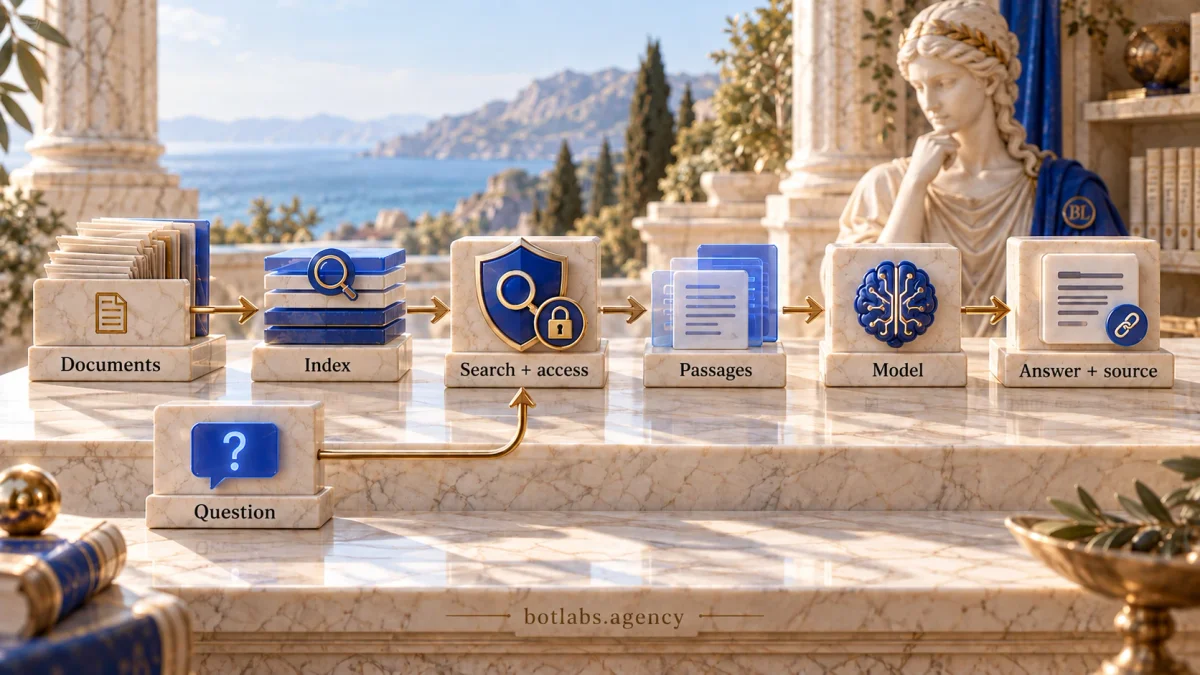
A typical corporate implementation has several stages:
- Prepare sources. Collect documents from approved repositories, remove unnecessary copies, and make the content usable for search.
- Index content. Split text into passages, attach metadata such as title, owner, date, and access level, and index it.
- Retrieve for a question. Use the employee’s query to find relevant passages. The user’s permissions should be applied to retrieval.
- Generate an answer. Give the model the question and retrieved context. The interface can show links to sources so a person can verify details.
These stages do not mean the system will always find the right content or summarize it correctly. Search can miss an important passage, documents can conflict, and generation can misread context. Source links, abstention when evidence is insufficient, and escalation of difficult questions to a subject-matter expert should therefore be part of the design and evaluation.
| Approach | What the user gets | When to consider it |
|---|---|---|
| Keyword search | A list of documents or passages | Employees can phrase searches and are prepared to read the material |
| RAG assistant | A drafted answer based on retrieved context and, when implemented, source links | Questions are phrased freely and knowledge is spread across sources |
| Model fine-tuning | Changed model behavior or output format for a task | Stable behavior or format is needed; it is not a universal store for changing facts |
RAG and fine-tuning address different needs and can be combined. An external knowledge source is useful for material that changes often; fine-tuning may help with behavior or format. The choice depends on the data, retrieval quality, privacy requirements, latency, cost, and maintenance. Neither method is universally superior.
What belongs in the knowledge base
Start with a work question, not a bulk upload of every company file. Gather recurring employee questions and identify the approved sources that already contain the answers. This keeps the first collection focused and gives you a basis for evaluation.
Useful first sources often include current procedures, employee instructions, product references, service policies, onboarding material, and internal answers to frequent questions. Choose a specific knowledge area, such as return rules or a technical inspection process. Avoid starting with the entire corporate drive if source owners, access classifications, and an update process are not in place.
For every source, establish:
- who owns the content and can confirm that it is current;
- which roles the document is intended for;
- its effective date and next review date;
- whether it is authoritative or reference material;
- which other documents may conflict with it.
An outdated document does not become correct because an AI system retrieved it. Define how to remove superseded versions, duplicates, drafts, and files without an owner from the index. If historical versions are needed for audit, retain them separately so they are not mixed with material used to answer current questions.
Email, personal information, commercially sensitive material, and restricted files need a separate decision before indexing. Check whether the chosen service is permitted to process them, how query logs are handled, and who can inspect the index. If a source has no clear purpose or owner, resolve that governance issue first.
Keeping content current and access controlled
A knowledge base is an ongoing change-management process, not a one-time file upload. Each source needs an owner responsible for its content and a clear review cycle. When a policy or procedure changes, the update must reach the search index, and the former version must be marked or removed under the retention rules.
Access control is a separate requirement. If an employee cannot open a document directly, the AI assistant should not use it to answer that employee. Microsoft describes document-level access control for search: user identity and access restrictions should be taken into account in search results. Implementation varies by platform, but the general principle is to enforce permissions while retrieving context, rather than asking a language model to guess what it may reveal.
Before launch, test at least these cases:
- users see only documents permitted for their role;
- access is revoked after a role change or departure;
- a link in an answer does not expose material to a wider audience;
- permissions apply consistently to passages, caches, exports, and logs;
- deleted or changed documents stop appearing in results;
- synchronization failures are visible to the responsible team.
Apply least-necessary access to repositories, indexes, and integrations. Record source identity, indexing date, and retrieval outcomes only to the extent needed for troubleshooting and audit, and avoid collecting unnecessary personal information in logs. Decide who investigates incorrect answers and how to temporarily disable a problematic source or assistant.
Reducing errors and unsuitable answers
RAG can ground an answer in retrieved sources, but it does not guarantee accuracy. Quality depends on reliable documents, effective retrieval, generation instructions, useful citations, and ongoing evaluation. An answer without a source or with an irrelevant source is a reason to investigate, not evidence of reliability.
Build a test set of real questions before launch. For each question, record the expected documents, key facts, permitted audience, and desired behavior when information is missing. Include questions the knowledge base cannot answer, ambiguous wording, conflicting versions, and queries from users with different access levels. Evaluate retrieval (whether the right material was found) separately from generation (whether the material was represented correctly).
Set rules for uncertainty: when the system should qualify an answer, ask for clarification, say it did not find the information, or route the question to an owner. Do not treat “answer only from sources” as the sole safeguard; an instruction cannot eliminate retrieval or interpretation errors. Open and review citations for clarity, sufficient context, and compliance with the user’s permissions.
OWASP’s 2026 GenAI Top 10 includes risks related to vector and embedding weaknesses. For a corporate knowledge base, this means controlling not only the model but also sources, content ingestion, indexing, permissions, and responses to malicious or incorrect material. Use the list to structure threat analysis, then choose controls for your own architecture.
A pilot plan and useful metrics
A pilot can be planned as a short cycle, such as 30 days, when scope, access, sources, and team availability are agreed in advance. This is an illustrative plan, not a promise that every corporate knowledge base can be launched on that schedule. Integrations, security review, document cleanup, or procurement can take longer.
- Set the boundaries. Choose one team and one type of question. Record the users, data involved, and what would count as a useful result.
- Prepare the corpus. Identify document owners, confirm current versions, label roles, and exclude unnecessary or sensitive material.
- Set a baseline. Record common questions, time to find an answer, and escalation rates in the existing process. Agree on test questions with subject-matter experts.
- Evaluate a prototype. Measure retrieval and answer quality; test permissions, citations, abstention when information is missing, and conflicting content.
- Run a limited trial. Give access to a small group, collect “helpful / not helpful” feedback, and review errors with knowledge owners.
- Decide what comes next. Compare results with the baseline, assess risk and cost, then improve sources, revise scope, or stop the pilot.
Measure more than query volume. Useful indicators include the share of answers experts judge correct and sufficient; retrieval of the expected passage; answers with relevant sources; correct abstentions when no answer is available; access-test results; escalations; time to a useful answer; and cost per handled query. Compare the same test scenarios and segment results by question type and user role.
A successful pilot is more than a demonstration of a few good answers. The team should understand where the tool helps, where it fails, who maintains the source material, and whether the risks and costs are acceptable. Only then should you decide whether to expand the audience or add sources.
Conclusion
A corporate AI knowledge base can make scattered instructions easier to use when retrieval is grounded in reviewed sources and access and updates are managed alongside it. RAG does not replace document quality, expert review, or security controls. Start with one concrete type of question, a limited collection of current sources, and clear quality criteria. Then a decision to scale can reflect how the system performs in a real workflow rather than the impression of a demo.
Frequently asked questions
RAG first searches connected sources for relevant information, then a language model uses the retrieved context to draft an answer. Links to documents can help people verify it when the system returns sources correctly.
No. Search may miss needed information, and the model may misinterpret a passage. You need content controls, separate testing of retrieval and generation, useful citations, abstention rules, and human escalation.
RAG adds context from external sources at answer time, while fine-tuning changes model parameters for particular behavior or output format. They solve different problems; the choice depends on whether facts must be updated, behavior changed, or the approaches combined.
Check user identity and permissions in the retrieval layer before passing passages to the model. Also test links, caches, logs, and index copies after access is revoked.
Timing depends on document quality, integrations, access rules, security requirements, and the amount of evaluation. A 30-day plan can illustrate a limited pilot, but it is not a guaranteed development or launch timeline.
Measure retrieval and answer quality separately, source relevance, correct abstentions, access tests, time to a useful answer, escalations, and cost. Prepare real questions and baseline measures from the existing process in advance.
Sources
- Lewis P. et al. Retrieval-Augmented Generation for Knowledge-Intensive NLP Tasks (2020).
- Microsoft Learn: Retrieval Augmented Generation (RAG) in Azure AI Foundry.
- Microsoft Learn: Document-level access control overview in Azure AI Search.
- OWASP GenAI Security Project: OWASP Top 10 for LLM Applications 2026.
- Further reading: chatbots, AI assistants, and AI agents · chatbot and CRM integration · choosing between a Telegram bot and a website chatbot.
Discuss your AI knowledge base with a specialist
In 15 minutes, we’ll discuss your document sources and staff access, and outline a useful first topic for a pilot.
Where should your
knowledge pilot start?
Discuss documents and access.
Outline a first topic for your team.