
AI Sales Control · calls + chats + CRM
AI Sales Control + CRM Your team talks to customers. AI updates your CRM.
AI analyzes calls and chats, creates summaries, captures commitments and updates your CRM under approved rules. Your sales rep continues the conversation while the system prepares the status, task, reminder and next-step checks.
We start with one channel, one CRM and a typical lead journey.

Demo · from conversation to action
Conversation endedCustomer expects a proposal tomorrow
12:41
Call
Chat
AI analysis
✓ Status
✓ Task
✓ Follow-up
A controlled workflow
One conversation. Four CRM actions.
Follow the chain of evidence: what the customer said, what AI extracted and which action the CRM confirmed. This is a demo scenario, not a customer recording.
The conversation is over. Your CRM is already updated.
- The system receives an available call transcript or chat and links it to the customer.
- AI extracts the intent, commitment, date and missing question.
- The approved CRM contract governs the summary, status, task and follow-up.
- The rep sees the next action; the sales lead gets an example for reviewing the process.
Two channels. One logic.
Choose a channel. Keep CRM actions controlled.
The source varies, but the architecture stays the same: receive an event, validate data, apply rules, record the result or send an exception to a person.
01 / Calls + CRM
The call ends. Your CRM update is ready.
AI receives a call recording or its transcript.
Explore call analysis ↗InputRecording/transcriptTelephony event received
→
AICommitment“Proposal tomorrow”; budget unknown
→
CRMStatus + taskResult confirmed by API
02 / Chats + CRM
Move deals forward with every chat.
AI brings conversations together, helps prepare replies, gives the sales rep full context and can trigger approved CRM operations. When a person is needed, the conversation continues.
Explore the chat workflow ↗InputTelegram / websiteConversation identified
→
AIIntent + contextReply or handoff to a sales rep
→
CRMSummary + follow-upThe owner sees the history
A modular rollout
Start with one process. Add channels gradually.
You do not need to rebuild the entire sales team at once. Start a pilot with calls or chats, then add a shared customer history once the data contract has been validated.
Calls + CRM
Review conversations without listening to every call.
- summaries and commitments;
- checks against approved criteria;
- tasks, follow-ups and coaching examples.
Chats + CRM
One workspace for chats, context and human handoff.
- conversations from available channels;
- AI suggestions and approved replies;
- CRM summaries, status and next steps.
One customer history
A new channel does not mean starting over.
When identifiers can be matched reliably, calls, chats and CRM events become one traceable journey. If the match is uncertain, the system sends the record for review instead of merging customers at random.
Our principle: a reviewed exception is better than a confidently corrupted customer record.
CallNeed clarified
The customer asks for an integration example and will return in the afternoon.
TelegramConversation continued
The rep sees the call summary and avoids repeating questions already answered.
CRMNext step recorded
A technical review task is created; the operation result is logged.
Built for the whole team
One solution. Three levels of business value.
Reps need a next action, sales leads need visible patterns and owners need a clear process that does not depend on memory. Interfaces and permissions are designed for each role.

Sales rep
Gets a summary, context, completed fields and a specific task without having to retell the call.
Head of sales
Reviews rule compliance, objection handling and missed questions using examples rather than impressions.
Business owner
Sees where the process breaks, which actions reach the CRM and which exceptions need a team decision.
CRM action contract
AI does not get unrestricted access.
Before development, we define the event, required fields, permitted action, success criteria and error handling. This contract separates controlled automation from an unconstrained prompt.
How we design CRM integrations ↗EventRuleConfirmation
Summaryafter transcriptionapproved fields only✓ saved
Statusafter a commitmentpermitted transition only✓ CRM ID
Taskwhen there is a next stepowner + deadline✓ task ID
Uncertaintyinsufficient datado not change critical fields! review

Reliability and boundaries
The outcome of every conversation is recorded in CRM.
We do not mark an operation complete just because AI generated text. It needs a system response, a technical identifier or another agreed confirmation.
- Least-privilege access. The module sees and changes only the required objects.
- Event log. Requests, responses, statuses, retries and owners remain traceable.
- Human fallback. Low-confidence results and failures go to a person.
- Data rules. Storage, access and deletion rules are agreed before launch.
We confirm compatibility with a phone system, messenger or CRM only after checking its API, plan, permissions and required events.
Evidence, with clear limits
See what we have actually delivered.
These cases demonstrate individual capabilities: chat automation, human handoff, CRM/ERP integrations and roles. We do not claim unverified sales growth from them.
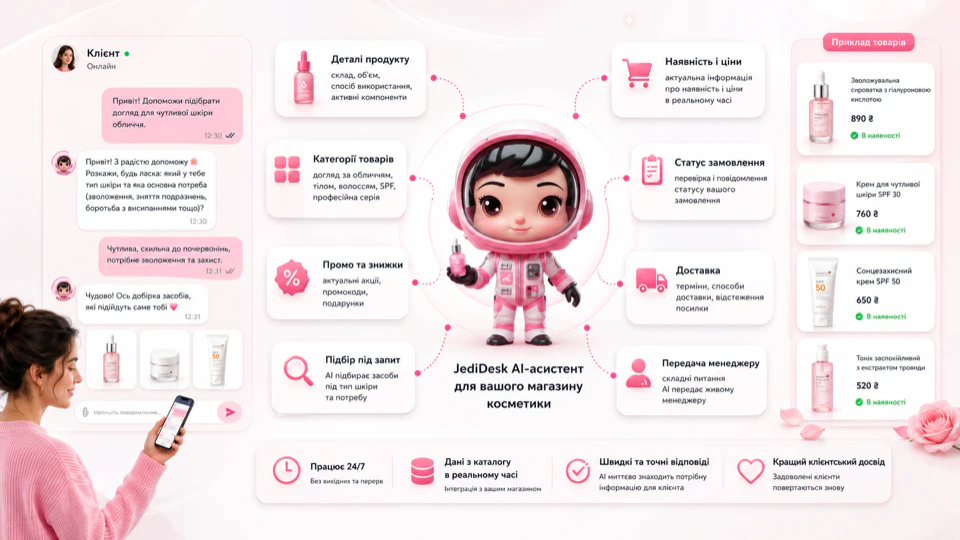
JediDesk · TANOYA
An AI assistant for chats with agent handoff.
The case documents a scenario library, catalog handling, real anonymized chat excerpts and human handoff. It demonstrates the chat module, not automatic CRM updates.
View case study ↗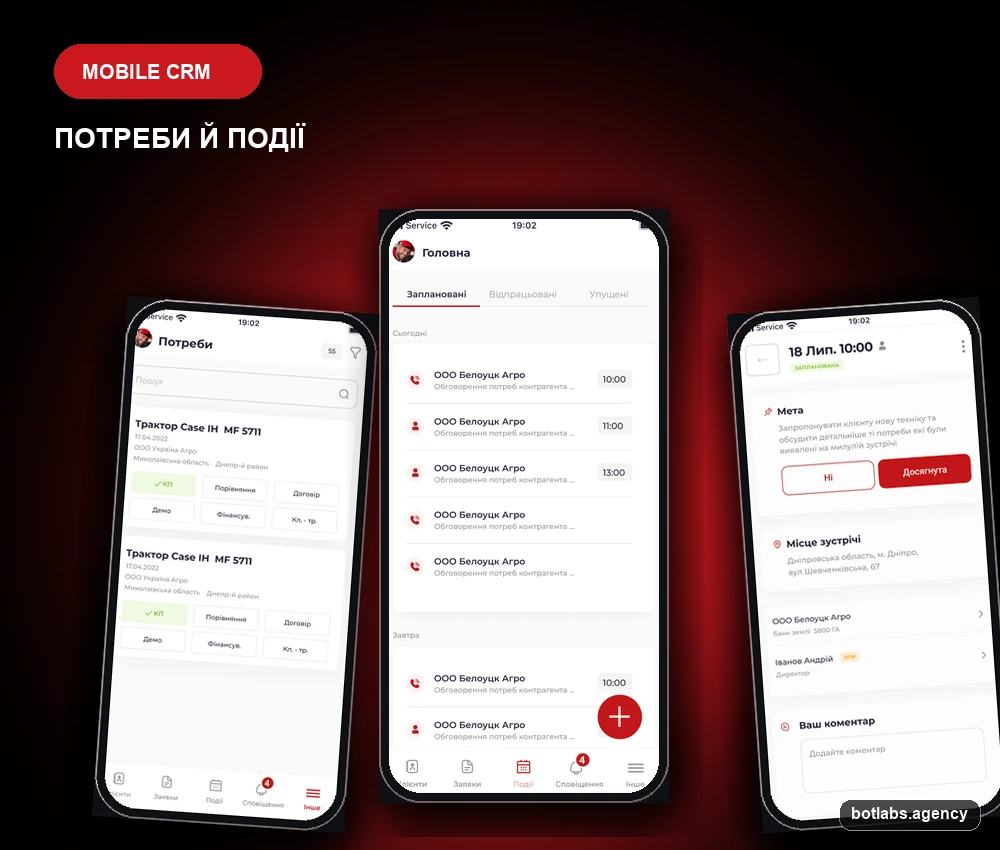
NFM AGRO · CRM
Mobile CRM, ERP sync and approvals.
The case demonstrates roles, Telegram approvals, ERP synchronization and offline workflows. It proves integration capability, not a claimed increase in sales.
View case study ↗
Responsible for the approachIvan Deyneka
Founder of BotLabs. Established in 2015, the agency builds custom B2B solutions, integrations and automation.
Updated:A pilot with clear boundaries
Five steps from conversation to a CRM outcome.
A pilot tests data access, rules and CRM outcomes on a controlled flow, rather than simply presenting a polished demo.
Get a pilot plan- 01
Process map
We map one typical journey: where conversations start, what must be recorded and who owns the next action.
- 02
Technical review
We verify transcripts or recordings, CRM APIs, permissions, limits, webhooks, identifiers and data requirements.
- 03
CRM and quality control
We agree on fields, permitted actions, exceptions, test cases, a baseline and acceptance criteria.
- 04
Prototype and pilot
We launch one channel and one event in a controlled segment, then verify the event log and agent-handoff mechanism.
- 05
Evidence-based decision
We compare outcomes with the baseline, then expand scope, adjust rules or stop the scenario with a clear explanation.
Is it a fit?
Who AI Sales Control is for.
A pilot makes sense when
- calls or chats are regularly copied into CRM manually;
- the required fields, statuses and next steps are defined;
- there is a process owner and access to test cases;
- the team is ready to start with a limited pilot.
Address the basics first when
- statuses and responsibilities are not yet defined;
- conversations or the CRM API are inaccessible;
- the expectation is autonomous AI without rules or review;
- success is defined only as a vague “more sales.”
FAQ
Before giving AI access to your CRM.
These answers explain the solution model. Specific channels, permissions and scope are confirmed after technical review.
What is AI Sales Control with CRM?
AI Sales Control is a custom AI solution that analyzes calls and chats, creates a structured summary and follows defined rules to perform CRM actions: it creates summaries, changes statuses, sets tasks and reminders, and routes the lead to the responsible sales rep.
Does it replace a sales rep or head of sales?
No. Reps handle negotiations and commercial decisions; the head of sales defines rules and coaches the team. AI handles repetitive recording, prepares next actions and highlights recurring gaps for human review.
Which calls and chats can be connected?
Calls and chats from Telegram, Viber, Instagram and your website can be connected. For integration, we verify access to call recordings or transcripts, customer identification, APIs or webhooks, and the CRM's integration capabilities.
What can AI do in the CRM?
The project CRM contract defines the actions. These may include adding summaries, filling approved fields, changing permitted statuses and creating tasks, reminders or notifications. Critical actions may require human approval.
What if AI is uncertain or the CRM is unavailable?
The system does not invent a result. If AI is uncertain, the request is sent to a person. If the CRM is temporarily unavailable, the system retries or assigns a task to the responsible sales rep, depending on the defined scenario.
How does the system review sales quality?
Before the pilot, the team agrees on criteria: needs discovery, required questions, objection handling, commitments and next steps. AI checks conversations against these criteria and prepares examples and patterns for the sales lead to review.
How does an AI Sales Control pilot start?
We start with one channel, one CRM and a typical lead journey. We define events, fields, rules, exceptions, baseline metrics and test examples, then build a prototype and validate it on real scenarios.
What determines the timeline and cost?
They depend on channels, transcript or recording access, CRM APIs, fields and actions, evaluation rules, languages, roles, data requirements, volume and acceptance criteria. A grounded estimate follows process mapping and technical review.
Next step
Get your AI Sales Control pilot plan.
Describe your channel, CRM and typical customer journey. We will follow up with discovery questions about access, events, fields, rules, exceptions and acceptance criteria.